General Description
In this first lab, you will install Visual Studio Code editor and will test your setup with simple lines of code.
Learning Objectives
- Install VS Studio Code editor
- Learn how to write initial JavaScript code and visualize its result in VS Studio Code
Table of Contents
Install Visual Studio Code
Microsoft Visual Studio Code is a free, powerful, lightweight code editor for Windows, macOS and Linux. ... click to learn more
Follow the instructions below to install Visual Studio Code in Windows or Mac
- Windows installation tutorial: https://docs.cse.lehigh.edu/vscode/installing-vscode-win/
- Mac installation tutorial: https://docs.cse.lehigh.edu/vscode/installing-vscode-mac/
Learn about VS Code's interface
Learn about VS Code's interface through the following link: https://code.visualstudio.com/docs/getstarted/userinterface
Install Quokka.js Extension:
Quokka.js is a VS Studio Code extension that runs JavaScript with instant feedback, displaying runtime values in your editor as you type.
- Click on the Extensions icon in the Activity Bar on the side of VS Code (four squares icon)
- In the search bar, type
Quokka.js - Click the blue Install button
Your First JavaScript code
JavaScript (JS) is a lightweight interpreted (or just-in-time compiled) programming language with first-class functions. While it is most well-known as the scripting language for Web pages, many non-browser environments also use it, such as Adobe Acrobat. ... click to learn more
- Start by creating a new VS Code file with the name "lab1.js". Go to
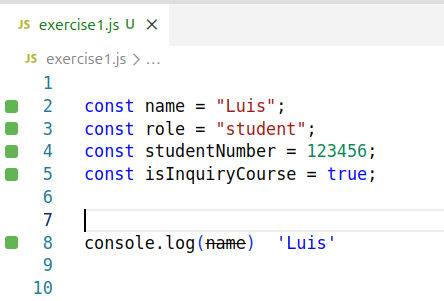
File > New Text Fileto create a new file - Type the following sample code in your VS Code file. Replace with your own information:
- Press Cmd + Shift + P (Mac) or Ctrl + Shift + P (Windows) and type "Quokka: Start on Current File". This will allow you to see the result of the value name input above.
- Try displaying other values by replacing
namewithrole,studentNumberorisInquiryCourseinsideconsole.log() - Save the changes made to your VS Code file for future reference.